remove.bg Closes December 1, 2026: We Tested 6 Tough Cut-Outs on a Pay-As-You-Go Alternative
The short answer
remove.bg has confirmed that its standalone website, desktop/mobile apps, Photoshop plugin and self-serve API shut down on December 1, 2026 at 9:00 AM CET. Interactive background removal moves into Canva (where Background Remover requires a Canva Pro subscription), unused pay-as-you-go (PAYG) credits expire that day without a refund, and API users are directed to Leonardo.Ai. If you just want to drop in an image and download a full-HD transparent PNG without a monthly subscription, Sticker Kitchen’s Background Remover works the same way: 10 free AI previews an hour with no sign-up, 100% free local removal on solid backgrounds, 1 non-expiring credit (US$0.075–$0.10, with 4 free welcome credits) for full-size HD downloads, and bulk ZIP batches up to 50 images. What we don’t offer: a public API or a Photoshop plugin.
Try a free preview with no sign-up →Key findings from our live test & cost math
- Across 5 classic torture-test photos—backlit curly hair, a white Samoyed on a cream rug, 36 bicycle wheel spokes, a faceted glass perfume bottle and a running shoe on asphalt—live production API runs finished in 13.0–21.6 s (mean 16.8 s) with zero manual brush touch-ups.
- On backlit flyaway curls, 10.2% of all pixels were smooth semi-transparent alpha transitions rather than a hard clipped helmet edge, and dozens of interior spoke gaps on the bicycle cleared in one pass.
- Flat solid-color graphics skip AI completely: browser flood-fill cleared the mint mascot backdrop in 19 ms for 0 credits without uploading the file.
- At 5 HD photos a month (60 a year), a ~US$120–$180/yr design subscription costs over 20× more than non-expiring pay-as-you-go packs (4 free welcome credits + a US$4.49 50-pack + a US$0.99 10-pack = US$5.48 total, with 4 credits left over).
- Honest edge cases we saw: AI matting cuts a clean outer silhouette around clear glass but keeps warm table tones refracted through amber liquid inside the bottle; default edge-only solid removal leaves tiny enclosed color pockets untouched until tapped once with the free Erase brush; and developers needing a REST API should look to Leonardo.Ai or PhotoRoom.
What changes when remove.bg shuts down on December 1, 2026
Canva acquired remove.bg’s parent company Kaleido AI in 2021 and has now set the final sunset date. Four practical changes hit existing users:
- Standalone site, desktop app & plugins go offline
- On December 1, 2026 at 9:00 AM CET, remove.bg’s web uploader, desktop batch app, mobile app, Photoshop extension and standalone accounts shut down permanently.
- Unused PAYG credits expire with no refund
- Pay-as-you-go credit balances must be spent before December 1, 2026—unused PAYG credits are forfeited without a refund. Active annual subscriptions end with a pro-rata refund.
- Web background removal requires Canva Pro
- Inside Canva, one-click Background Remover is a Canva Pro feature (~US$15/month or ~US$120/year for individuals), replacing remove.bg’s standalone credit bundles.
- Developers must migrate off api.remove.bg
- The self-service remove.bg API closes on the same date, with official migration documentation pointing automated workflows to Leonardo.Ai (also owned by Canva).
Pricing & workflow math: subscription vs. pay-as-you-go
If you already live inside Canva Pro all day for decks and social templates, using Canva’s built-in remover costs nothing extra. If you only want a fast “upload image → get transparent PNG or white product shot” utility, here is how the numbers compare:
| Feature / scenario | remove.bg (closing Dec 1) | Canva Pro | Sticker Kitchen Background Remover |
|---|---|---|---|
| Billing model | Monthly plan or high-cost PAYG | Monthly or annual subscription | Pay-as-you-go (1 credit/photo), no subscription |
| Free preview | Small preview image free | Requires Pro trial or subscription | 10/hr signed out, 30/hr signed in—no sign-up |
| White, green-screen & solid colors | Charged full HD credit | Requires Canva Pro | 100% free in your browser, unlimited, no upload |
| Light use: 5 HD photos/mo (60/yr) | ~US$35–$54 in PAYG packs | ~US$120–$180/year | US$5.48 total (4 free + US$4.49 + US$0.99), 4 credits left |
| One-off 50-photo product shoot | 50-credit bundle or 1-month sub | 1-month Pro sub (must cancel) | US$4.49 one-time 50-credit pack, single ZIP download |
| Credit expiry | Monthly rollover cap; PAYG dies Dec 1 | Ends when subscription stops | Never expires; auto-refund on failure; free re-downloads |
| Brush touch-up & #FFFFFF backdrop | Included on web | Inside full Canva editor | Free Erase/Restore brushes & instant white/color swap |
| Sticker border, captions & GIFs | None | Manual canvas effects | 1-click handoff to sticker outline, meme text & GIF remover |
| Public REST API & Photoshop plugin | Yes (until Dec 1, 2026) | Enterprise integrations only | No public API, no Photoshop plugin |
How we tested
- Test set: 6 synthetic 1024×1024 images built to stress-test the exact edges where background removers fail—backlit flyaway curls, white Samoyed fur on a cream sheepskin rug, 36 thin bicycle wheel spokes in front of brick, a faceted clear glass perfume bottle, a running shoe with harsh asphalt shadow, and a bold-outlined corgi sticker on flat mint.
- Live pipeline: The 5 photographic cases called our live production endpoint (POST /api/image-cutout/preview), fetched the full 1024×1024 alpha mask, and composited it onto the original pixels identically to the browser studio. The solid-color mascot ran our default local flood-fill (tolerance 20, edge-connected, halo cleanup on).
- Zero manual touch-ups: Every output shown below is the raw first-pass result—we did not clean up a single pixel with the Erase or Restore brushes.
- Metrics recorded: End-to-end wall time (upload + inference + mask fetch), full-resolution RGBA PNG size, foreground coverage, and soft-edge feathering percentage (pixels with partial alpha between 8 and 247).
Measured results across all 6 test images
| Test image | Mode & cost | Input size | Live time | Output PNG | Soft-edge pixels |
|---|---|---|---|---|---|
| Backlit curly hairPortrait · flyaway hair | AI (1 credit) | 285 KB | 21.6 s | 2.72 MB | 10.22% |
| White dog on cream rugPet · low contrast | AI (1 credit) | 153 KB | 20.7 s | 1.51 MB | 3.05% |
| Bicycle wheel spokesInterior holes · thin spokes | AI (1 credit) | 406 KB | 15.1 s | 2.85 MB | 4.89% |
| Clear glass perfume bottleProduct · glass to white | AI (1 credit) | 212 KB | 13.0 s | 2.28 MB | 0.48% |
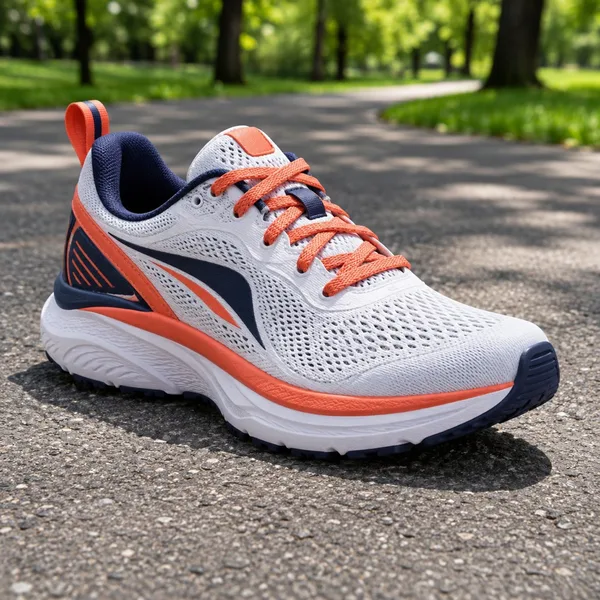
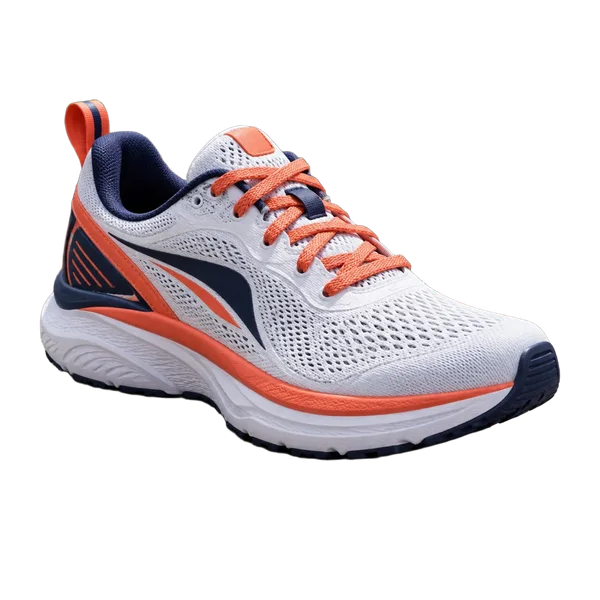
| Running sneaker on pavementE-commerce · laces to white | AI (1 credit) | 284 KB | 13.5 s | 2.28 MB | 0.69% |
| Mascot on solid mintIllustration · free local mode | Local solid (free) | 961 KB | 19 ms | 1,007 KB | 0.00% |
Side-by-side results & 1:1 original-pixel edge zooms
Each card shows the 1024×1024 input next to the untouched output (checkerboard for transparent sticker/portrait exports; pure #FFFFFF white for the two e-commerce product shots), followed by a 256×256 1:1 pixel crop so you can inspect hair strands, fur tufts and metal spokes without downscaling.

Original · 1024×1024

Cut-out · transparent PNG

1:1 crop · original

1:1 crop · cut-out on checker
Preserved loose golden flyaways, hoop earring and crochet strap loops with smooth semi-transparent alpha (10.22% of all pixels are feathered edge transitions) instead of clipping hair into a helmet. A faint warm bokeh haze lingers inside the tightest backlit curl pocket at top-right, invisible on light backdrops or inside a sticker outline.

Original · 1024×1024
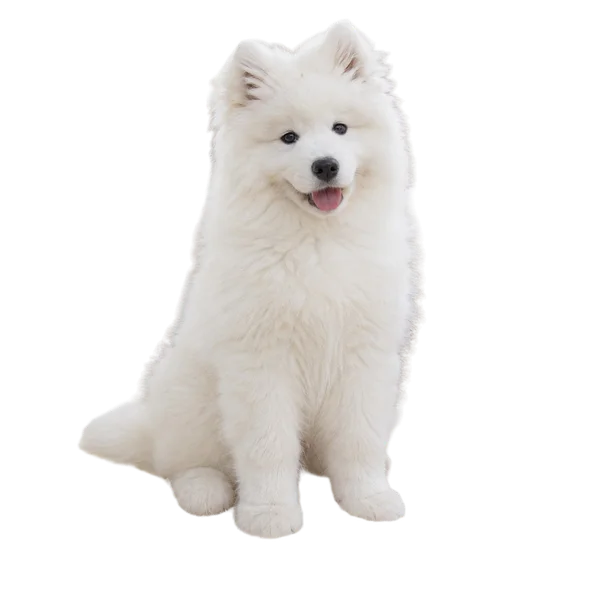
Cut-out · transparent PNG

1:1 crop · original
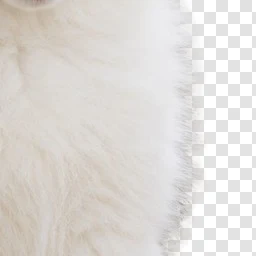
1:1 crop · cut-out on checker
White fur against a cream sheepskin rug has almost zero brightness contrast, defeating color-threshold tools. AI cleanly separated the chest ruff, paws and tail tufts (3.05% feathered pixels) without dragging rug fibers in or biting into the paws.
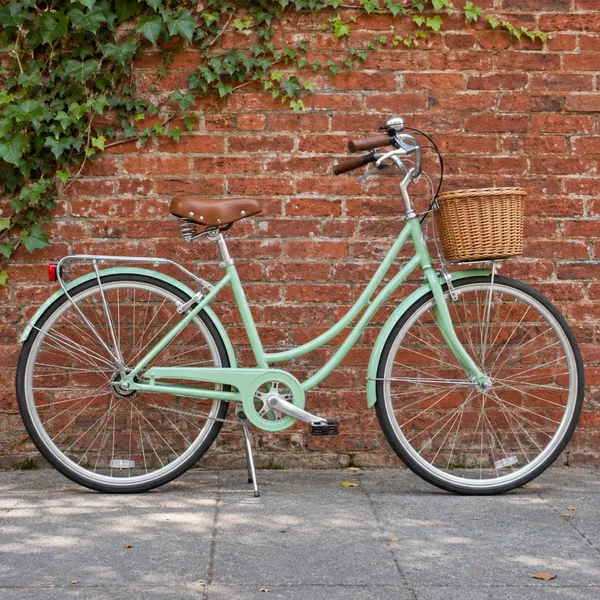
Original · 1024×1024
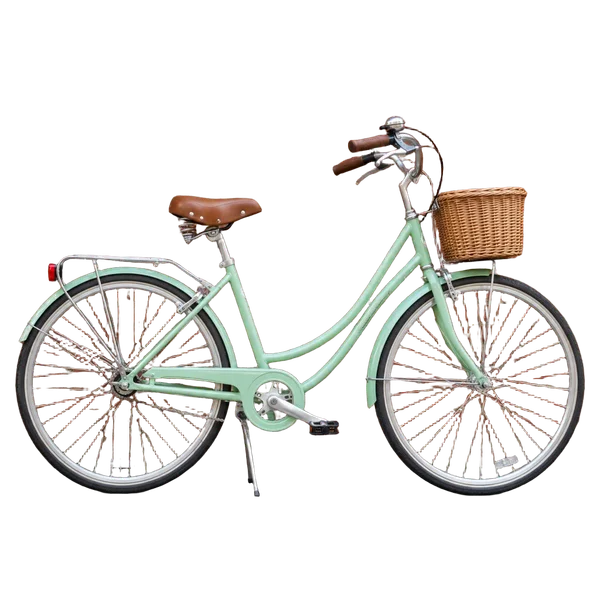
Cut-out · transparent PNG
1:1 crop · original
1:1 crop · cut-out on checker
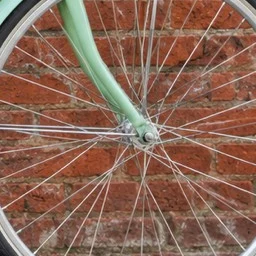
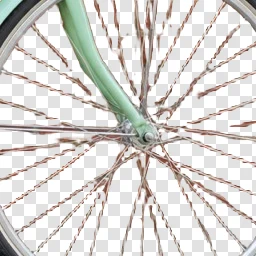
Punched out dozens of interior holes—between thin wheel spokes, saddle springs, rear rack, chainring and brake cables—in one pass with zero manual brushing. At 1:1 pixel zoom, 1–2 px steel spokes retain slight warm reddish color spill from the brick wall behind them.

Original · 1024×1024
Cut-out · swapped to #FFFFFF white

1:1 crop · original
1:1 crop · cut-out on checker
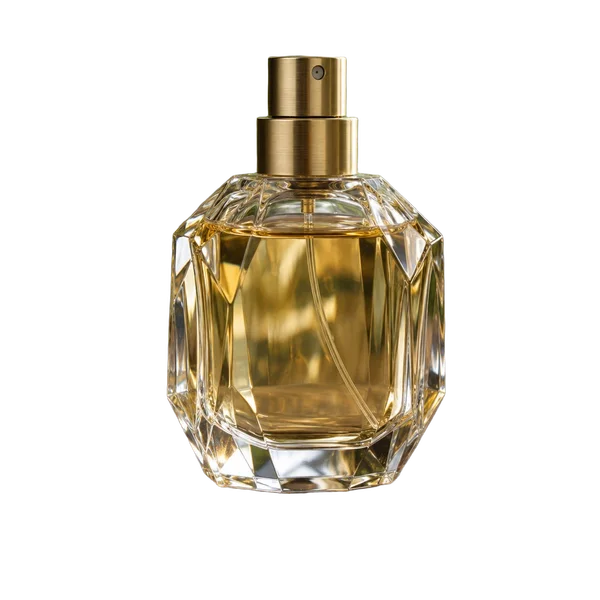
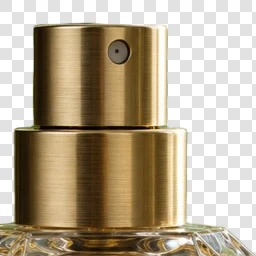
Crisp geometric edges along the brushed-brass atomizer and faceted crystal shoulders (0.48% soft edge), swapped onto pure #FFFFFF white in one click. Physics note: AI matting cuts the outer silhouette cleanly (opaque inside the bottle), so warm wood tones refracted through the amber liquid stay inside the glass rather than turning semi-transparent.
Original · 1024×1024
Cut-out · swapped to #FFFFFF white
1:1 crop · original
1:1 crop · cut-out on checker
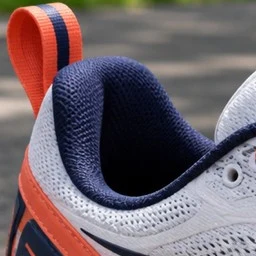
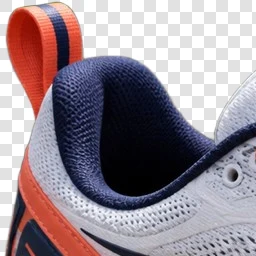
Cleanly stripped the harsh asphalt ground shadow, park bokeh and the pavement showing through the orange heel pull-tab loop, leaving clean white midsole and knit collar edges ready for #FFFFFF marketplace listings.

Original · 1024×1024

Cut-out · transparent PNG

1:1 crop · original

1:1 crop · cut-out on checker
Detected the flat mint backdrop automatically and stripped it locally in 19 ms—0 credits, no upload, no sign-up. Because flood-fill starts only from the outer frame edges to protect white fur and cup lids inside characters, one tiny enclosed triangle between the coffee cup and cheek stays filled until tapped once with the free Erase brush.
Which remove.bg alternative should you actually pick?
- Pick Sticker Kitchen Background Remover
- Best if you cut out portraits, product listings or stickers on demand—whether 3 images a month or 50 in a seasonal batch—want free no-login previews, refuse another monthly subscription, or want one-click handoff to white sticker outlines and captions.
- Pick Canva Pro
- Best if you already pay for Canva Pro every month to lay out social posts, slide decks and print flyers, and want background removal right inside the same multi-layer canvas.
- Pick Leonardo.Ai or PhotoRoom API
- Best if you are an engineer migrating automated api.remove.bg scripts, webhooks or Shopify/ERP pipelines—or a retoucher who relies on a native Photoshop panel (Creative Cloud subscribers also have Remove Background built into Photoshop).
- Working with animated GIFs?
- Still-image removers flatten animations. Use our GIF Background Remover instead—solid-color GIFs are removed free in your browser, and real-world video GIFs use frame-by-frame AI matting.
Need to cut out animated stickers or reaction clips? Open the GIF Background Remover, or send any transparent PNG straight to Add Outline to Image for a die-cut white border.
Download the raw benchmark data
Every sample’s dimensions, input bytes, output PNG bytes, live API wall-clock time, foreground ratio and feathered-edge ratio are available in plain CSV: Download results.csv
Frequently asked questions
- When exactly is remove.bg shutting down?
- remove.bg’s official announcement sets December 1, 2026 at 9:00 AM CET as the cutoff when its standalone website, desktop and mobile apps, Photoshop plugin and legacy API go offline and fold into Canva.
- Will remove.bg refund unused Pay-As-You-Go credits?
- No. Unused PAYG credits expire permanently on December 1, 2026 with no refund, so spend any remaining balance before that date. Active annual subscriptions receive a pro-rata refund for unused time.
- How do I remove a background in Canva for free?
- Inside Canva, the native Background Remover is locked to Canva Pro (free accounts only get a one-time Pro trial). If you want to remove backgrounds without starting a Pro subscription, use a browser tool like Sticker Kitchen where previews and solid-color graphics are free and HD photo downloads cost pennies per image with no recurring bill.
- How much does Sticker Kitchen cost compared with remove.bg, and do credits expire?
- Solid-color backgrounds (white, green screen, flat pastel) are 100% free with no login. Complex photos include 10 free previews/hour signed out, and full-size HD transparent PNGs cost 1 credit each. New accounts get 4 free welcome credits; top-up packs are US$0.99 (10 credits), US$4.49 (50 credits) or US$7.49 (100 credits = US$0.075/image). Credits never expire and failed runs auto-refund.
- Can I batch-remove backgrounds like the old remove.bg desktop app?
- Yes, right in the browser with nothing to install. Drop up to 50 images at once into Bulk mode: you see the exact credit total upfront (solid-color, already-transparent and previously unlocked images cost 0), apply a transparent or solid #FFFFFF backdrop to the whole set, and download a single ZIP.
- Does Sticker Kitchen offer a developer API to replace api.remove.bg?
- No. Sticker Kitchen is a web studio for people, not an API platform. For automated server-to-server background removal, check Canva’s recommended migration target Leonardo.Ai or dedicated APIs like PhotoRoom.
- Can I add a white die-cut sticker border right after removing the background?
- Yes. Click Add outline on any finished cut-out to send the full-resolution transparent PNG straight into our free outline tool for an even, rounded white sticker border—no Photoshop needed.
Test it on your own photo—free preview, no sign-up
Solid backgrounds are free forever. Complex photos preview free and unlock at full HD size for 1 non-expiring credit, with bulk ZIP support up to 50 images.
Open Background RemoverRelated tools:Remove background · Add outline to image · GIF background remover · GIF & image meme maker · Photo to sticker AI