

Portrait
Input: Backlit street shot with shops and people


The people and shops behind her are gone; flyaway hair and the phone in her hand stay intact.
Free preview · No sign-up · No watermark
Upload a photo and the background comes off automatically—see the result free, without signing in. Solid backgrounds are removed free in your browser; for photos, download the full-size transparent PNG for 1 credit when you’re happy with it. Swap in a white, blue or red background, or touch up details with a brush.


 Turn a cut-out portrait or pet into a GIF with AIMake your photo move with AIUpload a photo, describe a motion, get a GIF in about two minutes
Step 1 · Choose a picture
PNG, JPG, WebP or HEIC up to 50 MB; pictures longer than 2560 px are scaled down. The background comes off as soon as you upload, and you can see the result without signing in. Solid backgrounds are free; a full-size transparent PNG of a photo is 1 credit.
No picture handy? Try a sample
Sticker Kitchen’s background remover is an online tool that removes the background from a picture as soon as you upload it and gives you a transparent PNG. Transparent pictures and solid backgrounds (white, green screen, any single colour) are handled free in your browser. For photos and real scenes, AI finds the subject: the preview is free with no sign-up, and the full-size result is 1 credit per picture. You can put any solid colour behind the subject and touch up with a brush; there’s no watermark.
Examples
All four were processed at the tool’s default settings with no brush touch-ups—the first three with AI, the last with the free solid-colour removal. The pictures are AI-generated.
Input: Backlit street shot with shops and people
The people and shops behind her are gone; flyaway hair and the phone in her hand stay intact.
Input: A grey cat on a grey sofa

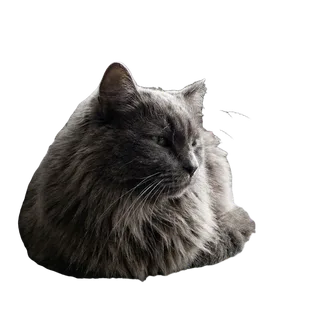
Cat and sofa are nearly the same colour, yet the AI separates them along the outline and keeps the fluffy edge.
Input: Iced tea in a glass on a wooden table, plants behind

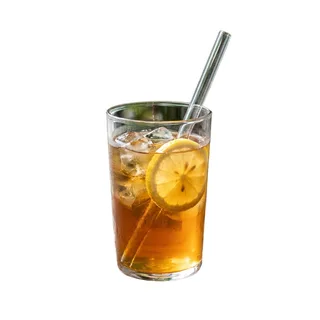
Table and plants out, plain white in: a ready marketplace shot, with the straw and rim intact.
Input: Cartoon cat on pink with text and sparkles


One background colour, detected and removed free in your browser—no AI, no credits.
Three steps
No Photoshop and no manual selections—three steps.
Choose a PNG, JPG, WebP or HEIC, drop it in or paste a screenshot. The tool decides for you: transparent pictures are ready, solid backgrounds come off free, and photos go to the AI automatically.
Check the free preview on a checkerboard, white or dark backdrop. Erase leftovers and Restore anything cut too far—touch-ups are free. Swap in a white, blue or red background if you like.
Transparent and solid-background pictures download free. An AI result downloads at full size for 1 credit (sign-in required; new accounts get 4 free credits). You can also add a white sticker outline in one click.
By picture type
The tool works out which case applies when you upload.
| Picture | What happens | Cost | Download |
|---|---|---|---|
| Already transparent PNG | Ready as is; change the colour if you like | Free | PNG |
| White, green screen or one colour | Removed automatically in your browser | Free | PNG |
| Portraits, pets, products | AI cut-out, free preview | 1 credit to download | PNG |
| Animated GIF | Handled frame by frame in the GIF background remover | Solid free; AI 1 credit per 100 frames | GIF |
Making a sticker? Use Add outline to image for a white border. For animated GIFs, use the GIF background remover.
remove.bg is closing
remove.bg has announced that its standalone website closes on December 1, 2026 (9:00 CET), with background removal moving into Canva; unused pay-as-you-go credits on the site expire the same day. If you just want to upload a picture and get a transparent PNG straight away, this tool does that.
Upload and the background comes off automatically—no sign-up, no install. See the result free, download when you’re happy.
White, green-screen and other single-colour backgrounds are processed in your browser: nothing uploaded, no limit, no charge.
One picture at a time and no public API; a full-size photo result is 1 credit, and credits don’t expire. Animated GIFs are handled frame by frame in the GIF background remover.
FAQ
Transparent pictures and solid backgrounds (white, green screen, one colour) are completely free, with no sign-up and no limit. Photos use AI: the preview is free with no sign-up, and the full-size transparent PNG is 1 credit per picture (sign-in required; new accounts get 4 free credits). Touch-ups and background colours are free, and there’s no watermark.
Upload the picture and the background comes off automatically—solid colours in your browser, photos by AI. Check the edges in the preview, touch up with the brush if needed, then download a PNG with a transparent background.
Yes. Without an account you get 10 free photo previews an hour, 30 when signed in; solid backgrounds aren’t limited. Downloading a full-size AI result needs an account.
After the background is removed, pick white, blue, red or any colour under New background; the preview updates straight away and the PNG downloads with it. Handy for marketplace product shots and ID photos—crop to the required ID size separately.
Open the brushes: Erase paints out leftover background, Restore brings back anything removed by mistake, with adjustable size and undo. Touch-ups run in your browser at no charge, and they carry over when you unlock the full size.
It keeps the most prominent subject—usually a person, pet, product or character—and removes background people and clutter. If two things are equally prominent it may keep both; paint out the one you don’t want with Erase.
The PNG matches your picture’s size; pictures longer than 2560 px are scaled to 2560 first. The free preview is a reduced view; only the full-size download uses a credit.
remove.bg has announced its standalone site closes on December 1, 2026, moving into Canva. This tool works much the same way: automatic on upload, free preview, no sign-up; solid backgrounds are free and full-size photo results are 1 credit each. The differences: one picture at a time and no public API.
This page handles still images. Upload a GIF and it offers to send it to the GIF background remover, which processes every frame and keeps the frame count and speed.
Transparent pictures and solid backgrounds are handled entirely in your browser and never uploaded. For AI, a reduced copy (1024 px on the long side) is uploaded to find the subject; the download is made from your original in your browser.
Yes—Safari on iPhone, Chrome on Android. Pick straight from your photos; iPhone HEIC photos work too.
Still have a question? Email support@biaoqingchufang.com
No GIF yet? Make one from a photoMake your photo move with AIUpload a photo, describe a motion, get a GIF in about two minutes