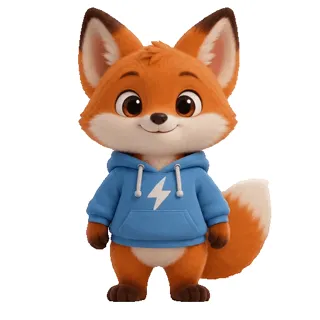
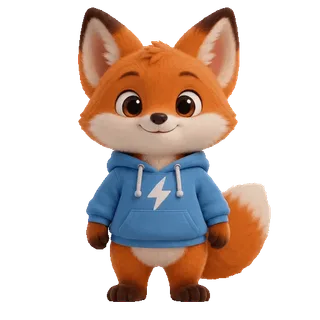
Cartoon sticker on white
Background: Plain white
Solid colour clears it in one go and keeps the white inside the character (eyes, belly). Free—no AI needed.
Free for solid backgrounds · No watermark · Batch
Remove the background from any GIF and get a transparent GIF. White, green-screen and other solid backgrounds come off free in your browser; AI handles people and real scenes. Size, frames and speed stay exactly as they were, and you can do several at once.


 Want a new GIF? Make one from a photoMake your photo move with AIUpload a photo, describe a motion, get a GIF in about two minutes
Step 1 · Choose GIFs
Up to 20 at a time, each up to 50 MB and 600 frames. Solid backgrounds come off free in your browser; for anything else, AI costs 1 credit per 100 frames.
No GIF handy? Try a sample
Sticker Kitchen’s GIF background remover is an online tool that makes the background of an animated GIF transparent. Solid backgrounds (white, green screen, any single colour) are removed free in your browser without uploading the file. People, real scenes and other complex backgrounds use AI at 1 credit per 100 frames. You get a transparent GIF at the original size, frame count and speed, with no watermark, and you can process several GIFs at once.
Before & after
All three GIFs were processed with this tool at its default settings (AI at the Standard edge), with no retouching; the person and the dog are AI-generated. After you upload, the tool checks the background and tells you which method fits.
Background: Plain white
Solid colour clears it in one go and keeps the white inside the character (eyes, belly). Free—no AI needed.
Background: Shelves, windows, other people

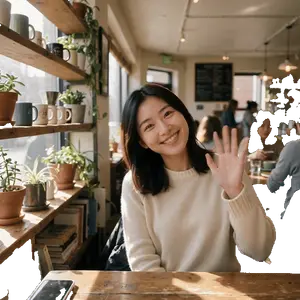
The background has no single colour, so solid mode barely removes anything. AI cuts out the person cleanly, including the people behind her.
Background: Grass, trees, a path
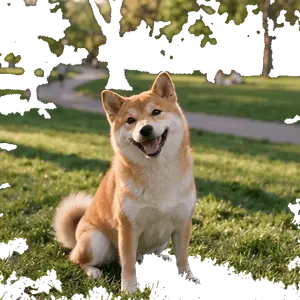
Grass and shade come in many tones, so solid mode only punches holes in the darkest patches. AI keeps the whole shiba, tail and fur included. GIF has no partial transparency, so fur tips look slightly stepped.
Three steps
No Photoshop, no frame-by-frame masking—three steps.
Choose one or more GIFs, drop them in or paste them—each up to 50 MB and 600 frames. The background colour of each GIF is detected automatically.
Pick Solid colour for white, green-screen or other one-colour backgrounds; tolerance updates a live preview of frame 1, and you can pick the colour from the picture. Pick AI for people and real scenes. Not sure? The tool checks each GIF’s border and tells you when the background is solid enough to remove free, or when it needs AI.
Check the edges on a checker, white, black or green backdrop, then download—several GIFs come as a ZIP.
Methods compared
Three ways to make a GIF transparent, each with its place.
| Compare | Solid colour (this tool) | AI (this tool) | Photoshop, frame by frame |
|---|---|---|---|
| Backgrounds | White, green screen, single colour | People, scenes, gradients | Anything |
| Cost | Free, unlimited | 1 credit per 100 frames | Software subscription |
| Speed | Seconds | About 30 s to 2 min | Manual per frame, tens of minutes |
| Upload | None | A reduced copy only | Local |
| Size & frames | Unchanged | Unchanged | Unchanged |
Too big after removing the background? Use the GIF compressor to meet WeChat or Discord limits. No GIF yet? Turn a photo into a GIF.
Common uses
Without a background, a GIF sits on anything.
Transparent stickers look right in light and dark chats on WeChat, Discord, Slack and Telegram, with no white box.
Lay an animated character over videos, live streams or slides without a box covering what’s underneath.
Drop transparent GIFs into web pages, email signatures and Canva or Figma designs on any colour.
FAQ
Solid backgrounds (white, green screen, one colour) are free, with no sign-up and no limit, processed in your browser. AI removal for people and complex scenes needs an account and costs 1 credit per 100 frames (rounded up), refunded if it fails. New accounts get 4 free credits.
Upload the GIF. If the background is one colour, use Solid colour—it detects the colour for you—adjust tolerance until the preview is clean, then press Remove background. For a complex background, switch to AI. The GIF you download has a transparent background.
Use Solid colour; white is detected automatically. Keep “From the edges” so white inside the subject (eyes, clothes) stays, and tick the halo option to clear the light fringe around the edges.
GIF transparency is all or nothing—no partial transparency—so hair and curved edges look stepped, and background colour blended into the edge leaves a light fringe. Tick the halo option or raise tolerance in Solid mode, or choose Trim tighter in AI mode. Converting the result to PNG won’t smooth it: PNG supports partial transparency, but the GIF only holds on-or-off pixels, so the lost edge detail can’t come back.
1 credit per 100 frames, rounded up—48 frames is 1 credit, 150 frames is 2—and the total shows on the button before you start. Credits don’t expire. Changing the edge setting on a GIF you’ve already processed costs nothing.
No. The result is built from every frame of your original GIF at the same size, frame count and timing, with the original colours. The AI only uses a reduced copy to find the background; your GIF is never shrunk. The file can get bigger—run it through the GIF compressor if needed.
Yes. Add up to 20 GIFs; each gets its own detected background colour, one press processes them all, and the results download as a ZIP.
In Solid colour mode, everything happens in your browser and the file never leaves your device. In AI mode a reduced copy is uploaded to work out the background; the final transparent GIF is made from your original in your browser.
Yes—Safari on iPhone, Chrome on Android. Very large GIFs are slower on phones, so use a computer for files with hundreds of frames.
Still have a question? Email support@biaoqingchufang.com
Powered by gifsicle by Eddie Kohler, open-source under GPL-2.0, compiled unmodified to WebAssembly. License and source
No GIF yet? Make one from a photoMake your photo move with AIUpload a photo, describe a motion, get a GIF in about two minutes