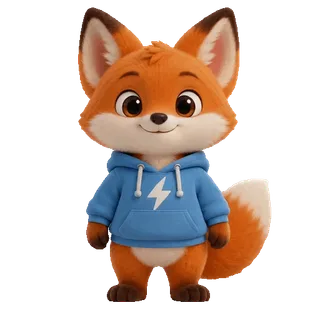
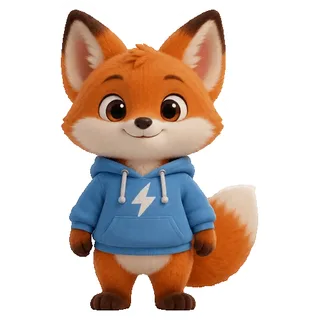
Transparent PNG sticker
Input: A PNG that’s already cut out
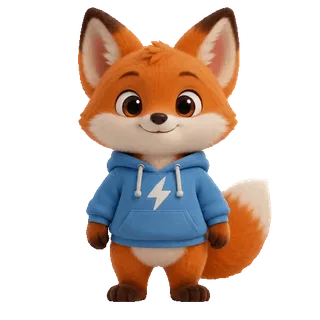
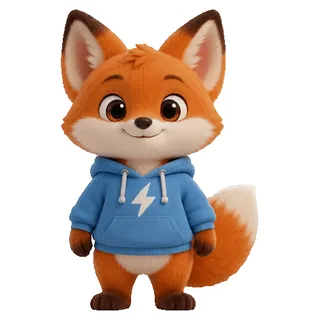
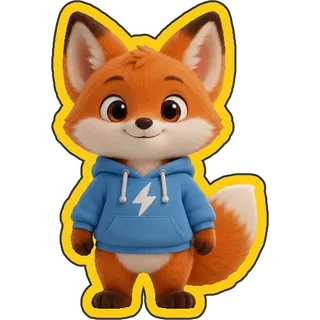
A cut-out PNG is outlined the moment it’s uploaded, free. White is the classic sticker border; yellow with a thin dark line stands out on any background.
Free outlines · No watermark · GIFs too
Put a sticker-style outline around any picture. Transparent PNGs are outlined as soon as you upload them, white and other solid backgrounds come off free, and photos can be cut out with AI first. Choose the thickness and colour—GIFs get outlined frame by frame too.


 Want your sticker to move? Animate a photo with AIMake your photo move with AIUpload a photo, describe a motion, get a GIF in about two minutes
Step 1 · Choose a picture
PNG, JPG, WebP, HEIC and animated GIF, up to 50 MB; pictures longer than 2560 px are scaled to 2560 first. Transparent PNGs are outlined right away; white and other solid backgrounds come off free; photos can be cut out with AI for 1 credit each.
No picture handy? Try a sample
Sticker Kitchen’s outline tool adds a sticker-style border around the subject of an image or GIF. Pictures with a transparent background are outlined directly; solid backgrounds are removed free in your browser first; photos and busy backgrounds can be cut out with AI for 1 credit each. The outline itself is free, made in your browser, with no watermark and your choice of thickness and colour.
Examples
All four were made with this tool at its default thickness (3% of the long side), with no retouching; outlined results sit on a dark backdrop so the white border shows. The cartoon cat and the portrait are AI-generated.
Input: A PNG that’s already cut out
A cut-out PNG is outlined the moment it’s uploaded, free. White is the classic sticker border; yellow with a thin dark line stands out on any background.
Input: Pink background, text and sparkles


The background is one colour, so the tool detects and removes it free. The cat, the text and every sparkle get their own white border—no credits.
Input: Backlit street portrait with shops and people behind


A busy background needs the AI cut-out (1 credit): the hair and the phone come out whole, then the white border goes on, and you have a portrait sticker. Anything off can be erased or restored with the brushes at no extra cost.
Input: A 48-frame GIF on white
Every frame gets the outline and the white background comes off free; frames and speed stay the same. GIF transparency is on or off, so the edge is a little harder than in a PNG.
Three steps
No Photoshop and no manual masking—three steps.
Choose a PNG, JPG, WebP, HEIC or GIF, drop it in or paste a screenshot. The tool checks whether the background is already transparent, and whether it’s a single colour.
Transparent PNGs skip this step; white and other solid backgrounds are removed automatically for free; for a photo press AI cut-out (1 credit). Fix anything that’s off by painting over it with the Erase and Restore brushes.
Drag the slider for thickness, pick a colour and add a thin dark line if you like. Pictures download as transparent PNGs; GIFs are outlined frame by frame and download as GIFs.
By picture type
After you upload, the tool works out which case applies and does the right thing.
| Picture | What happens | Cost | Download |
|---|---|---|---|
| Transparent PNG / WebP | Outlined directly | Free | PNG |
| White or solid background | Background removed automatically, then outlined | Free | PNG |
| Photo or real scene | AI cut-out, brush touch-ups, then outlined | 1 credit | PNG |
| Transparent or solid-background GIF | Background removed and outlined on every frame | Free | GIF |
| GIF with a busy background | GIF background remover first, then back here | 1 credit per 100 frames | GIF |
Sending the GIF on WeChat or Discord? Use the GIF compressor to get it under the size limit. To add a caption first, use the meme maker.
Common uses
An outline makes the subject pop off any background.
Stickers for WhatsApp, Telegram, Discord and WeChat usually carry a white border so they read on light and dark chats alike.
Printed and die-cut stickers need a white margin around the subject; the outline is that margin, ready to lay out as a transparent PNG.
Cutting out a person and giving them a white border is the go-to way to make them stand out on video thumbnails, posters and slides.
FAQ
Upload the picture. A transparent PNG shows the outline right away; a solid background is removed automatically first; for a photo, press AI cut-out. Adjust the thickness and colour, then download a transparent PNG with the outline.
Upload a transparent PNG—the outline is white by default at 3% of the long side—and download. If white gets lost on light backgrounds, tick the thin dark line.
Outlining is free, with no sign-up and no limit, done in your browser. Transparent and solid-background pictures are free all the way; only photos that need the AI cut-out cost 1 credit each (sign-in required, refunded if it fails; new accounts get 4 free credits).
Yes. White and other solid backgrounds are removed automatically for free; for photos and real scenes use AI cut-out (1 credit), which finds the main subject and removes the rest. If it takes too much or too little, paint with the Erase and Restore brushes—no extra charge.
It keeps the most prominent subject—usually a person, pet or character—and removes background people and clutter. When two things are equally prominent it may keep both; paint the one you don’t want with the Erase brush.
Yes. GIFs with a transparent or solid background are outlined frame by frame (a solid background is removed free at the same time), with the same frames and speed. For GIFs of people or real scenes, run the GIF background remover first, then press Add outline to bring it back here. GIF transparency is on or off, so the edge is harder than in a PNG.
Yes. Thickness runs from 0.5% to 10% of the long side, shown in pixels; colours include white, black, yellow, pink and blue, or any colour you choose; and you can add a thin dark line outside for a two-layer sticker edge.
In Photoshop you cut the subject out and then add a Stroke layer style. Here you upload the picture and the cut-out and outline happen for you—no software, no sign-up (except for the AI cut-out), and it works in a phone browser.
The PNG is trimmed to the outer edge of the outline, so its size usually differs from the original; pictures longer than 2560 px are scaled to 2560 first. A GIF keeps its picture and grows on every side by the outline width.
Outlining, solid-colour removal and brush touch-ups all happen in your browser; the picture never leaves your device. Only the AI cut-out uploads a reduced copy to find the subject, and the result is applied to your original.
Still have a question? Email support@biaoqingchufang.com
Powered by gifsicle by Eddie Kohler, open-source under GPL-2.0, compiled unmodified to WebAssembly. License and source